
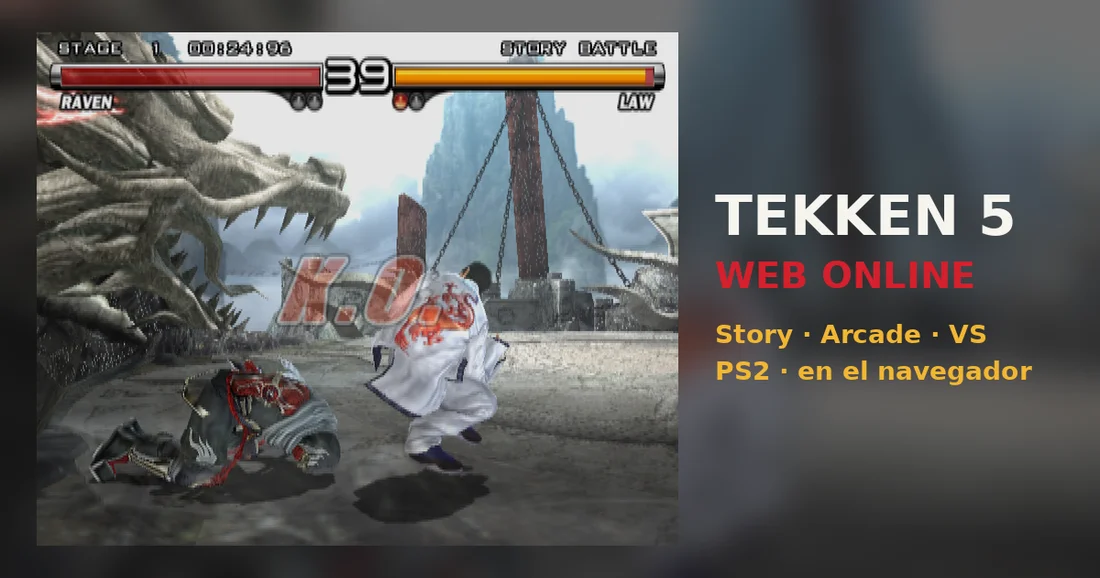
Read the controls below, then open the game website.
QUICK CONTROLS
- While the game loads, you can play Starblade, the Namco arcade game included on the disc.
- Use the arrow keys to move and A, W, S and D for the square, triangle, cross and circle buttons; Enter is Start and Backspace is Select, and keys can be remapped.
- For online VS Battle, the room creator chooses VS BATTLE in the mode menu and each player picks a fighter with their own controller.
PLAYING HERE
This game opens on its creator or browser-port website.
Needs an up-to-date Chrome or Edge; online VS Battle has not been tested with two players yet, and finding an opponent can take a while because the community is small.
Full playing guide ↓THE GAME
About Tekken 5
Namco's fifth main Tekken entry sends fighters into the King of Iron Fist Tournament, with a story mode and a two-player VS Battle. This browser version runs the European release through WebAssembly and WebGPU with nothing to install.
How to play
- While the game loads, you can play Starblade, the Namco arcade game included on the disc.
- Use the arrow keys to move and A, W, S and D for the square, triangle, cross and circle buttons; Enter is Start and Backspace is Select, and keys can be remapped.
- For online VS Battle, the room creator chooses VS BATTLE in the mode menu and each player picks a fighter with their own controller.
While the game loads, you can play Starblade, the Namco arcade game included on the disc. Use the arrow keys to move and A, W, S and D for the square, triangle, cross and circle buttons; Enter is Start and Backspace is Select, and keys can be remapped. For online VS Battle, the room creator chooses VS BATTLE in the mode menu and each player picks a fighter with their own controller.
Provided by Namco (2005) · Browser version / host: Slayoner. Licence / source Game / browser-port project ↗
KEEP PLAYING
All 523 games →Find your next game

DOOM — Shareware
Shooting
Dragon Ball Z: Budokai 2
Fighting
Tekken: Dark Resurrection
Fighting
Neverball
Arcade
TMNT (Series)
Fighting ▶Game website ↗
