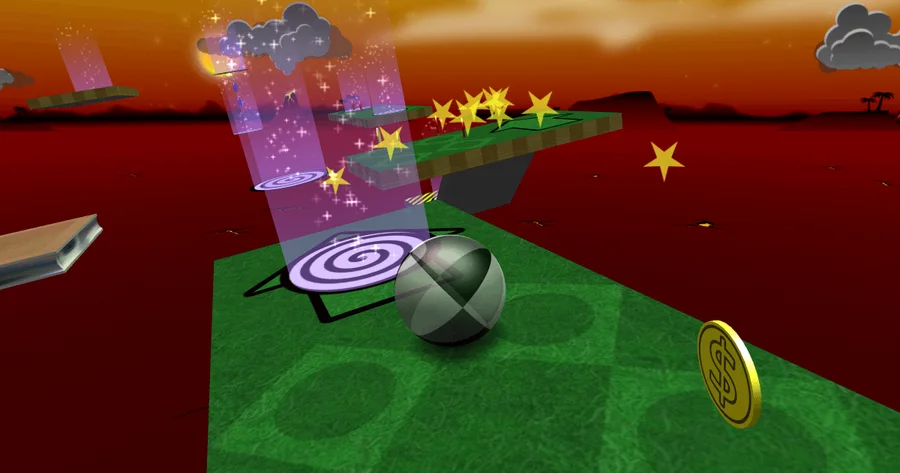
Choose Play now to load the game.
QUICK CONTROLS
- Move the mouse or use the arrow keys to tilt the floor.
- Mouse buttons rotate the camera; S and D rotate it left and right.
- Escape pauses or resumes. R restarts the current level in normal play.
- Keys 1, 2 and 3 select Chase, Lazy and Manual camera modes.
PLAYING HERE
Click inside the game to focus its controls. Use theater or fullscreen mode for more room.
Full playing guide ↓THE GAME
About Neverball
Tilt the entire floor to roll a glass ball through suspended obstacle courses. Collect enough coins to open the goal, then reach it before the clock runs out. Small, careful movements matter more than speed.
How to play
- Choose Play and begin with an easy level set. Read the level's coin target before moving away from the start.
- Apply a gentle tilt towards a nearby coin. Ease off before corners or narrow edges; holding a strong tilt keeps building speed.
- Collect enough coins to unlock the exit. Red coins count as five and blue coins as ten, so a safe route to a higher-value coin can shorten the trip.
- Line up with the unlocked exit and roll into it before the timer runs out. If you fall in normal mode, restart and try a smaller tilt on the difficult turn.
Choose Play Now, then Play and the Easy level set. Move the mouse or use the arrow keys to tilt the floor; use gentle movements to slow down near an edge. Collect the required coins to unlock the goal, then roll into it before time expires. Left and right mouse buttons rotate the camera. Escape pauses the game.
You control the slope of the floor, not the ball directly. Small tilts build momentum; returning the floor towards level gives you time to line up the next turn. Collect the required coins to unlock the exit, then roll into it before time runs out.
When the camera makes a turn confusing
Rotate the view until the next section of track is easy to read. The official default controls use the mouse buttons or S/D for rotation, with 1/2/3 switching camera modes.
If the page scrolls instead of the floor moving, click inside the game first. Use the pause screen before moving the pointer back to the surrounding page.
Normal and Challenge mode
Normal mode lets you replay unlocked levels and practise without tracking a stock of lives. The manual documents a limited ball stock in Challenge mode, where you work through the set in order and cannot restart freely.
A fall or expired timer costs an attempt. Learn a troublesome corner in normal play before making it part of a Challenge run.
Guide notes & sources
Official Neverball README, manual and browser entry reviewed on 2026-11-02. Prior site checks reached the first easy level and observed floor tilt. Coin values, goal unlocking, keyboard/camera bindings and mode rules are manual-documented; this review does not claim a completed level, Challenge completion or persistent-score test.
Guide checked .
Provided by Neverball contributors. Licence / source Browser port project ↗
KEEP PLAYING
All 523 games →Find your next game

Taiko no Tatsujin
Arcade
DOOM — Shareware
Shooting ▶Game website ↗
Happy Wheels
Arcade ▶Game website ↗
Friday Night Funkin’
Arcade
Superfighters
Shooting ▶Game website ↗